

Team Settings
In the Settings tab, administrators and developers can manage team information, review the account’s pricing plan and usage, and configure API credentials and dependencies.
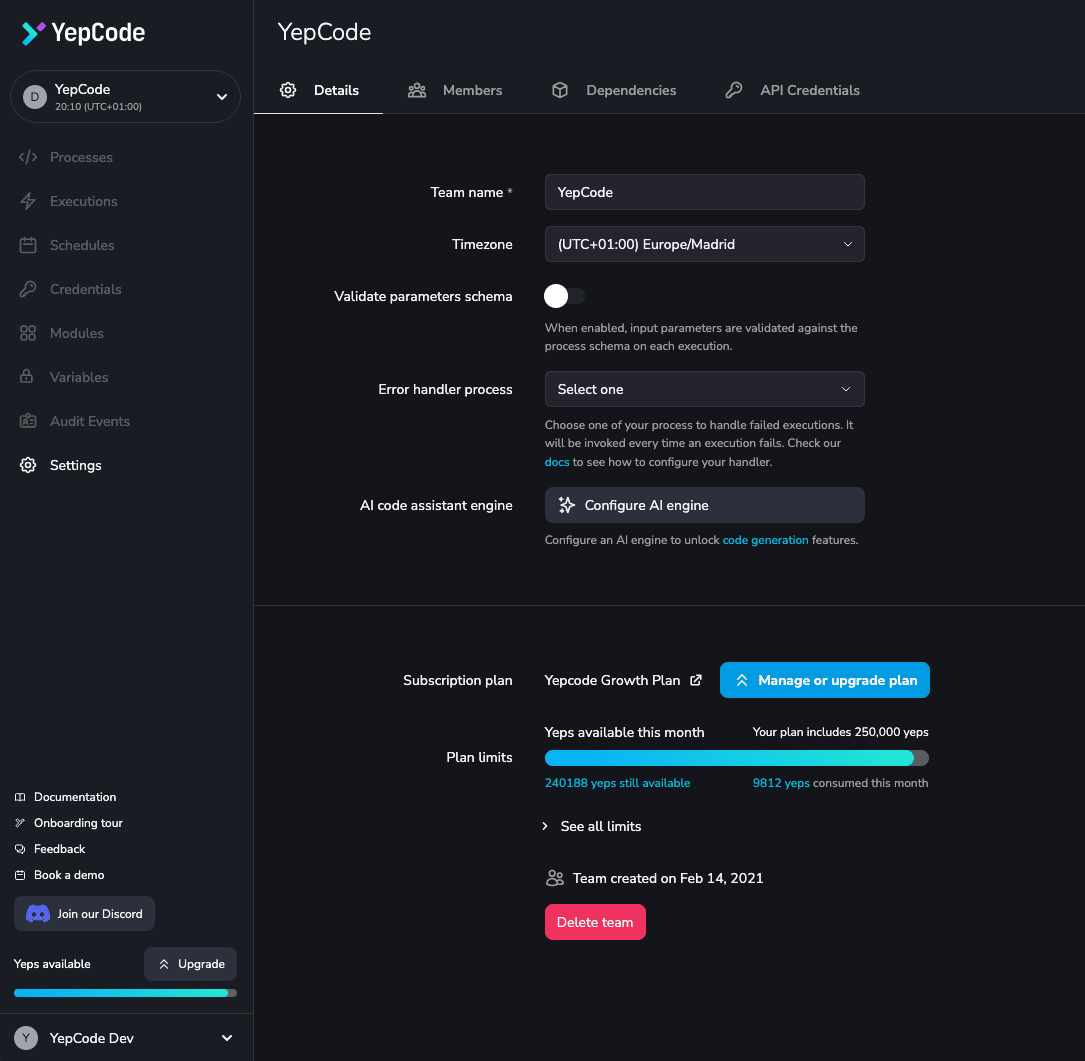
Team details
Section titled “Team details”The Details tab holds the settings that apply to the whole team.
Team name and slug
Section titled “Team name and slug”Both are fixed when the team is created and cannot be changed from this page. The slug is what appears in every URL. To rename a team, contact us.
Timezone
Section titled “Timezone”The IANA time zone the team runs in. It is what scheduled
processes are interpreted against, and what fcode.team.timezone
returns inside a process.
Primary locale
Section titled “Primary locale”The workspace’s main language. It is the locale used when an execution or a form render does not name one, and the fallback for keys the chosen locale has not translated yet. Left unset, the workspace’s first locale is used. See Internationalization.
Validate parameters schema
Section titled “Validate parameters schema”When enabled, the input parameters of every execution are validated against the process’ parameters schema before it runs, and an execution with invalid input fails instead of starting.
Error handler process
Section titled “Error handler process”The process invoked whenever another process fails, optionally pinned to a version tag. See handling errors.
Parent teams
Section titled “Parent teams”The teams this one inherits processes, modules, variables, locales and dependencies from. Up to five, and cycles are rejected.
Each parent can optionally be pinned to one of its workspace
versions — a published tag, or an alias such as stable.
A pinned parent contributes only the processes, modules and locales snapshotted at that version,
and contributes them with the snapshot’s content, so the parent can keep editing (and even
publishing new versions) without changing what this workspace runs. An alias pin follows the alias:
re-pointing it in the parent moves every workspace pinned to it. Without a pin the parent resolves
live, as before.
Its dependencies follow the pin too — you install the packages that version was published with, not the ones the parent installs today. Variables have no versioned form and always resolve live.
A version or alias that another workspace is pinned to cannot be deleted until that workspace unpins it; re-pointing an alias stays allowed — that is how a new version is promoted.
Because the parent link decides this, an inherited process, module or translation file shows the version it is inherited at as a read-only picker in its editor — the pinned tag, or Live for an unpinned parent — and does not follow the workspace version selected in the sidebar, which only covers what this workspace owns. The editor shows the content that version published rather than the parent’s current draft.
Webhook authentication
Section titled “Webhook authentication”Tick Enable global webhook auth and two fields appear, defining the credential that every process webhook set to Use the workspace configuration expects:
- Webhook variable — the name of the team variable holding the expected token. Only the name is stored here; the value lives in the variable, and a secret variable keeps it out of the dashboard and out of exports. The variable does not need to exist yet.
- Webhook header — defaults to
Authorization, whose value must then beBearer <token>. Any other header receives the raw value. Usex-factorial-wh-challengefor webhooks that Factorial itself sends, since that sender cannot be told to useAuthorization.
Configuring it here means one token protects many webhooks and rotating it is a single change. Each
process still chooses whether to use it, in the webhook’s Edit auth option — see webhook
authentication for the full request format.
Unticking the checkbox removes the configuration. Every webhook that inherits it then rejects all
calls with a 403 until it is configured again or those webhooks are switched to their own
configuration.
Workspace versions
Section titled “Workspace versions”The Versions tab publishes and manages workspace versions
— a single tag applied to every process, module, translation file and dependency manifest owned by
the team — and the workspace aliases (such as production) that point at them. Browsing and running
a version happens from the version selector in the sidebar.
Manage Subscription Plan
Section titled “Manage Subscription Plan”This area allows you to view and modify your current subscription details:
- Upgrade to access additional features.
- See your active plan and its limits.
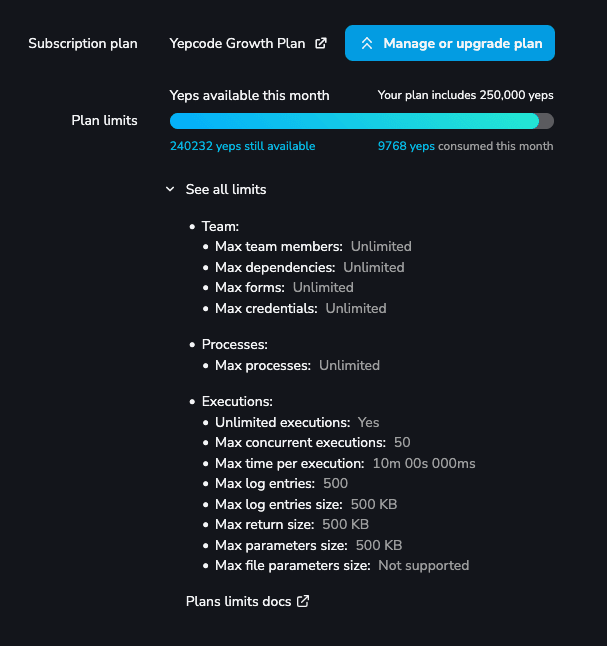
By clicking the upgrade plan button, any administrator can initiate an account upgrade, unlocking a more powerful version of Factorial Code.
The yeps consumption component display the amount of Yeps consumed in the current billing period and the remaining available Yeps.
Delete Team
Section titled “Delete Team”Teams are no longer deleted from this page. To delete a team, contact us — deletion results in a complete data wipe and cannot be undone.