

Webhook Executions
Webhooks are endpoints that you can provide to other external ecosystems.
This is very handy because it allows you to trigger process executions from external systems.
Configuration
Section titled “Configuration”From the process page, you may find the Webhook configuration section on the right sidebar.
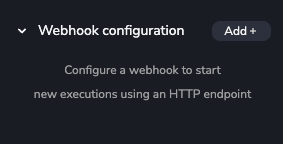
Once you press the Add + button, you can create the webhook and choose how callers authenticate:
- Public — anybody who knows the URL can start the process, so take care about it!
- Use the workspace configuration — the webhook inherits the team’s
webhook authentication, so one variable protects every
webhook that opts in and rotating it is a single change. If the workspace has no configuration,
every call is rejected with a
403, and the dashboard shows a warning linking to the settings. - Custom header and variable — the webhook names its own team variable and, optionally, its own header.
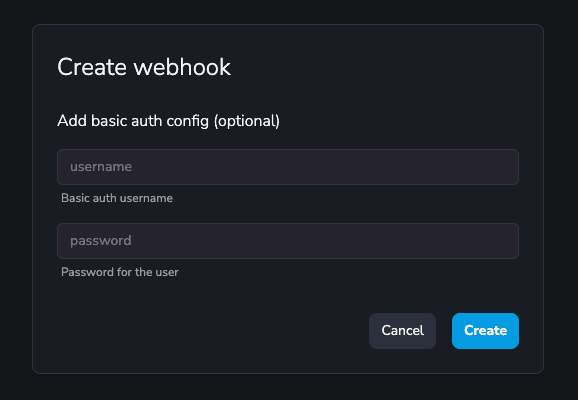
The variable does not need to exist yet — you can name it now and create it later. Until it exists,
every call to the webhook is rejected with a 403, and the dashboard shows a warning with a
shortcut to create it.
After creating the webhook, you can see:
- The generated URL link, points to the process using its Slug, which you can configure.
- The cURL command.
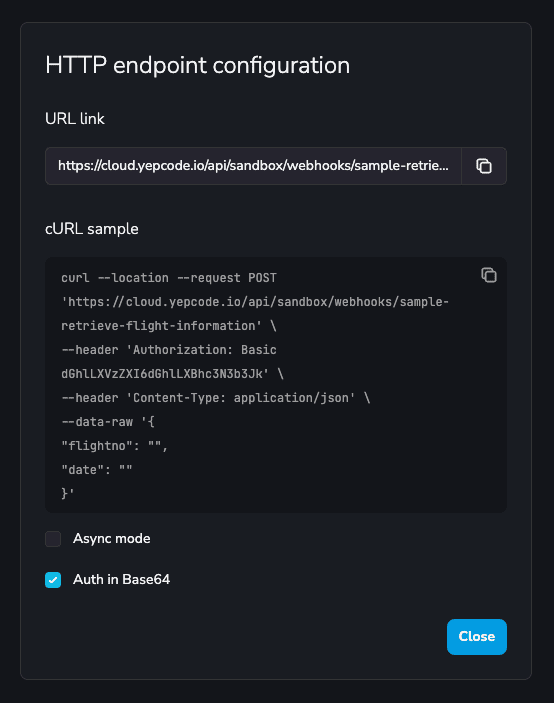
Now in the process Webhook configuration section you’ll see the created webhook. From the options menu you can:
- Change how the webhook is protected — the mode, and the header and variable of a custom
configuration — in
Edit auth - See the URL link and cURL command in
Show endpoint(also by clicking on the webhook itself).
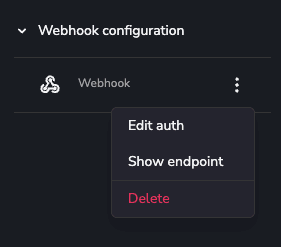
Congrats! Your webhook is ready for external requests.
Authentication
Section titled “Authentication”A protected webhook expects the value of its team variable in the configured header. In the default
Authorization header it must be sent as a bearer token:
curl --location --request POST 'https://code.factorialhr.com/platform/api/my-team/webhooks/my-process' \ --header 'Authorization: Bearer the-value-of-the-variable' \ --header 'Content-Type: application/json' \ --data-raw '{}'In any other header the value is sent raw, with no Bearer prefix:
curl --location --request POST 'https://code.factorialhr.com/platform/api/my-team/webhooks/my-process' \ --header 'x-factorial-wh-challenge: the-value-of-the-variable' \ --header 'Content-Type: application/json' \ --data-raw '{}'Only Authorization carries a mandatory scheme (per RFC
7235); a header of your own has no
grammar the sender must obey, so its value is compared exactly as sent. Sending Bearer <token> to
a custom header is therefore rejected.
Both plain and secret team variables can be used; a secret one keeps the token out of the dashboard and out of exports.
Webhooks sent by Factorial
Section titled “Webhooks sent by Factorial”Factorial’s own webhook sender identifies itself with the x-factorial-wh-challenge header, and
cannot be told to use Authorization: Bearer instead. Set x-factorial-wh-challenge as the header
name — for the whole workspace or for that one webhook — and a Factorial-originated webhook
authenticates without the sender changing anything.
When a call is rejected
Section titled “When a call is rejected”| Mode | Workspace configuration | Variable | Request | Result |
|---|---|---|---|---|
| Public | — | — | anything | executes |
| Workspace | not set | — | anything | 403 |
| Workspace | set | does not exist | anything | 403 |
| Workspace | set | exists | matching header | executes |
| Custom | — | does not exist | anything | 403 |
| Custom | — | exists | Authorization: Bearer <value> (default header) | executes |
| Custom | — | exists | <Your-Header>: <value> (custom header) | executes |
| Workspace or Custom | — | exists | header absent, wrong scheme, or value mismatch | 403 |
A webhook set to inherit the workspace configuration while the workspace has none rejects every call. That is deliberate: an owner who chose to protect a webhook should never find it silently open.
The token goes in Authorization by default because proxies, gateways and log pipelines redact that
header, so the secret stays out of their access logs. That is the trade-off of a custom header: no
denylist knows it, so its value can end up in the access logs of anything between the caller and us.
Prefer Authorization unless the sender cannot use it.
Because the configuration only stores the variable name, the token itself never travels in a
process export or in the metadata.json file the CLI commits.
Invoking Webhooks Externally
Section titled “Invoking Webhooks Externally”Make an HTTP GET or POST to test your configured webhook, use a tool like Postman, Insomnia or curl in your terminal.
Payloads passed from the request body are included in Factorial Code parameters.
For example, this implementation would perform echoes from provided parameters:
// my echo processconst {  context: { parameters },} = fcode;
return parameters;
# my echo processparameters = fcode.context.parameters
return parameters;Invoke it using curl from the terminal with some parameters:
curl -X GET -H "Content-Type: application/json" \https://code.factorialhr.com/platform/api/your-team/webhooks/your-process-slug?name=John%20Doe# {"name":"John Doe"}The same example using POST, parameters in POST are passed as request body:
curl -X POST -H "Content-Type: application/json" -d '{"name": "John Doe"}' \https://code.factorialhr.com/platform/api/your-team/webhooks/your-process-slug# {"name":"John Doe"}Request Context
Section titled “Request Context”When a webhook is invoked, Factorial Code provides access to the request context through fcode.context.request. This object includes:
headers: The request headers.rawBody (Js) / raw_body (Py): The request raw body.query: The request query parameters.method: The request method.
const { context: { request: { headers, rawBody, query, method } },} = fcode;request = fcode.context.request
headers = request.get("headers", {})raw_body = request.get("raw_body", "")query = request.get("query", "")method = request.get("method", "")For example, we could send a header signature to improve our process security:
curl --location --request POST 'https://code.factorialhr.com/platform/api/your-team/webhooks/your-process-slug' \--header 'Content-Type: application/json' \--header 'Factorial Code-Signature: yp_test_y4Fb38t5RngUZiZSzFC4c4lZHFKHcC'And validate that signature matches in the process:
const {  context: { request },} = fcode;
if (  request.headers["fcode-signature"] !==  "yp_test_y4Fb38t5RngUZiZSzFC4c4lZHFKHcC") {  return {    status: 400,    body: {      error: {        message:          "Invalid signature. Double check the 'Factorial Code-Signature' header",      },    },  };}
request = fcode.context.request
if request.get("headers", {}).get("fcode-signature", "") != "yp_test_y4Fb38t5RngUZiZSzFC4c4lZHFKHcC": return { "status": 400, "body": { "error": { "message": "Invalid signature. Double check the 'Factorial Code-Signature' header", }, }, };For better security, you can verify signatures using the raw body content. This approach ensures the integrity of the entire payload by creating a hash of the request body:
SECRET_KEY="your-secret-key"PAYLOAD='{"name": "John Doe", "amount": 100}'# Generate a signature with your secret key using HMAC-SHA256SIGNATURE=$(echo -n "$PAYLOAD" | openssl dgst -sha256 -hmac "$SECRET_KEY" | sed 's/^.* //')
curl --location --request POST 'https://code.factorialhr.com/platform/api/<your-team>/webhooks/<your-process-slug>' \--header 'Content-Type: application/json' \--header "X-Signature-SHA256: sha256=$SIGNATURE" \--data-raw "$PAYLOAD"
And validate the signature in your process:
const crypto = require("crypto");
const {  context: { request },} = fcode;
const secretKey = process.env.WEBHOOK_SECRET_KEY; // Store your secret securely with Factorial Code team variablesconst receivedSignature = request.headers["x-signature-sha256"];const expectedSignature = `sha256=${crypto  .createHmac("sha256", secretKey)  .update(request.rawBody)  .digest("hex")}`;
if (receivedSignature !== expectedSignature) {  return {    status: 401,    body: {      error: {        message: "Invalid signature. Payload integrity check failed.",      },    },  };}
return {  status: 200,  body: {    message: "Signature verified successfully",  },}
import hmacimport hashlibimport os
def main(): # Store your secret securely with Factorial Code team variables secret_key = os.getenv("WEBHOOK_SECRET_KEY")
request = fcode.context.request received_signature = request.get("headers", {}).get("x-signature-sha256", "") expected_signature = f"sha256={hmac.new(secret_key.encode(), request.get('raw_body', '').encode(), hashlib.sha256).hexdigest()}"
if received_signature != expected_signature: return { "status": 401, "body": { "error": { "message": "Invalid signature. Payload integrity check failed.", }, }, }
return { "status": 200, "body": { "message": "Signature verified successfully", }, }Request Headers
Section titled “Request Headers”There are also some predefined headers that you can use to control the execution of your process:
- Fcode-Version-Tag: Specify your process version tag — or a version alias — to run a concrete version of your process. Also available as the
version_tagquery parameter. (optional) - Fcode-Async: Choose to run the webhook synchronously or asynchronously. Sync executions will wait the process to finish before returning the response, while async executions will respond instantly with 201 HTTP code and a JSON informing about execution id. (optional) default:false
- Fcode-Initiated-By: Provide an additional level of abstraction to identify who is initiating requests to the Factorial Code endpoints. Its value will be recorded and can be consulted in the audit events. This allows clients to track and review the specific initiators of API requests for auditing and compliance purposes. It is optional and can be used in addition to the standard user authentication. (optional)
- Fcode-Agent-Pool: If your team has configured more than one Agent Pool you can specify in which one the process will execute. Otherwise, the default pool will be used. (optional)
- Fcode-Comment: The comment for the new execution. (optional)
- Fcode-Locale: The locale the execution resolves
fcode.i18nagainst. When omitted, the workspace’s primary locale is used. Also available as thelocalequery parameter. (optional)
Query Parameters
Section titled “Query Parameters”- async: Same as Fcode-Async header. It takes precedence over the header. (optional) default:false
- async_response: Customize the response body for async webhook executions. When provided, this content will be returned as the response body instead of the default JSON. Set to
falseto return no body. (optional) - version_tag: Same as Fcode-Version-Tag header. It takes precedence over the header. (optional)
- locale: Same as Fcode-Locale header. It takes precedence over the header. (optional)
These names are reserved: they control the execution and are never passed to your process as parameters. In particular, a body field named locale is stripped — use another name for business data.
Pinning a version from a URL
Section titled “Pinning a version from a URL”Many webhook subscription systems only let you configure a URL, with no control over the request headers. In that case pass the version tag — or a version alias — in the query string:
# By version tagcurl -X POST "https://code.factorialhr.com/platform/api/your-team/webhooks/your-process-slug?version_tag=v1.0.0"
# By alias, so you can repoint it later without touching the external systemcurl -X POST "https://code.factorialhr.com/platform/api/your-team/webhooks/your-process-slug?version_tag=stable"
A version that does not exist does not fail the call: the process runs on its current version and Factorial Code logs a warning. A subscription pinned to a version you later delete keeps working instead of erroring — at the cost of a typo running the current version silently, so check the execution’s version if a run behaves unexpectedly.
Custom Async Response Body
Section titled “Custom Async Response Body”By default, async webhook executions return a JSON response like this:
{"id":"cb045e6a-48e4-4bc4-a7be-a09bca0ffbe5","status":"CREATED","data":null}However, you can customize this response by using the async_response query parameter. This allows you to provide a custom message or content that will be returned as the response body instead of the default JSON.
Examples:
# Custom response messagecurl -X POST "https://code.factorialhr.com/platform/api/your-team/webhooks/your-process-slug?async=true&async_response=Working%20on%20it"# Response: Working on it
# No response bodycurl -X POST "https://code.factorialhr.com/platform/api/your-team/webhooks/your-process-slug?async=true&async_response=false"# Response: (empty body)
# Default behavior (no async_response parameter)curl -X POST "https://code.factorialhr.com/platform/api/your-team/webhooks/your-process-slug?async=true"# Response: {"id":"cb045e6a-48e4-4bc4-a7be-a09bca0ffbe5","status":"CREATED","data":null}Response Headers
Section titled “Response Headers”When you start executions using a webhook, you may want to set some headers in the response to the client. This can be useful to inform the client about the execution status, or to provide a link to the execution details.
This can be done by setting the response headers in the process code:
return { status: 201, // The HTTP status code to return to the client headers: { your-custom-header: "the-header-value" // The header to return to the client }, body: { message: "Any other response body" // The response body to return to the client }}return { "status": 201, # The HTTP status code to return to the client "headers": { "your-custom-header": "the-header-value" # The header to return to the client }, "body": { "message": "Any other response body" # The response body to return to the client }}There are also some predefined headers that you can use to control the execution of your async process execution:
- Fcode-Execution-ID: All requests to webhooks returns this header indicating the execution id.
- Location header: Async executions return this header indicating the location of the execution.
Tips & Examples
Section titled “Tips & Examples”Here you have some sample requests with a sample process:
curl --location --request POST 'https://code.factorialhr.com/platform/api/your-team/webhooks/sample-process-versions' \--header 'Fcode-Async: true'curl --location --request POST 'https://code.factorialhr.com/platform/api/your-team/webhooks/sample-process-versions?async=true' \curl --location --request POST 'https://code.factorialhr.com/platform/api/your-team/webhooks/sample-process-versions' \--header 'Fcode-Version-Tag: v1.0.0' \--header 'Fcode-Async: false'curl --location --request POST 'https://code.factorialhr.com/platform/api/your-team/webhooks/sample-process-versions?version_tag=v1.0.0&async=false'curl --location --request POST 'https://code.factorialhr.com/platform/api/your-team/webhooks/sample-process-versions' \--header 'Fcode-Async: false'curl --location --request POST 'https://code.factorialhr.com/platform/api/your-team/webhooks/sample-process-versions?async=false' \curl --location --request POST 'https://code.factorialhr.com/platform/api/your-team/webhooks/sample-process-versions' \--header 'Fcode-Comment: execution-comment'