

Process Versioning
Factorial Code keeps versions of your processes and modules, so an execution can run a specific snapshot of the source code instead of whatever the editor holds today.
Manage versions
Section titled “Manage versions”Versions are published for the whole workspace at once: creating a
workspace version snapshots every process, module,
translation file and dependency manifest the team owns under one tag, such as v1.0.0. Publish one
from the Create version action of the version selector in the sidebar, or from the Versions
tab of the team settings, where the versions and their aliases are managed.
The CLI and the API can still publish a version of a single process or module, and those versions keep running wherever a tag is accepted; the web application only offers the workspace ones.
Browsing a version
Section titled “Browsing a version”The version selector is the pill in the header of the sidebar’s Develop section, next to the pages it applies to, once the workspace has a version. Picking a version or an alias puts the workspace in version mode: the processes, modules, translations and dependencies pages show what that version contains — including processes deleted since it was published, and excluding the ones created after it — and every editor shows the snapshot, read-only. A notice heading those pages names the version you are looking at, with a Back to live action; picking Live in the selector does the same.
A published version cannot be edited: to continue working on a process, go back to live and keep coding.
While a version is selected, it is also the version that runs: Run now, new schedules, the webhook snippet and the form embed code all pin to it, so the version selector is the one place to choose which version to execute.
An execution pinned to a version also resolves the translations and the dependencies published under the same tag, so a release runs against the text and the packages it shipped with rather than the current ones.
Run now with version
Section titled “Run now with version”Select the version in the sidebar and press Run on the process: the on-demand execution runs that version, and the run dialog shows the tag it is pinned to. With the workspace live, the run uses the current source code.
Scheduled execution with version
Section titled “Scheduled execution with version”Scheduled executions (cron jobs) created while a version is selected are pinned to it. Editing a schedule lets you change its version among the workspace versions and aliases, or drop the pin to follow the live code.
Webhook execution with version
Section titled “Webhook execution with version”For webhook executions, pass the Fcode-Version-Tag HTTP header to use one version source code:
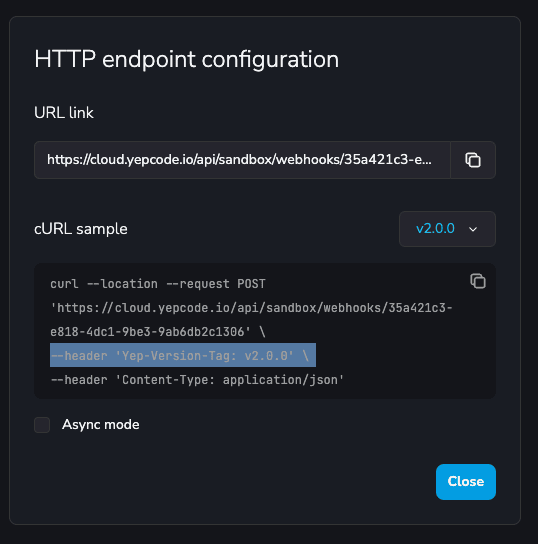
If the calling system only lets you configure a URL — as many webhook subscription systems do — use the version_tag query parameter instead:
curl --location --request POST 'https://code.factorialhr.com/platform/api/your-team/webhooks/your-process-slug?version_tag=v1.0.0'The query parameter takes precedence over the header when both are present.
Form execution with version
Section titled “Form execution with version”For embedded forms, add the data-fcode-form-process-version attribute to the embed snippet:
<div data-fcode-form-team="your-team-slug" data-fcode-form-process="your-process-slug" data-fcode-form-process-version="v1.0.0"></div>The process dashboard generates this snippet for you: with a version selected in the sidebar, the
embed code carries it automatically. See pinning a form to a process version for the Fcode.initForm and React equivalents.
Version aliases
Section titled “Version aliases”To maximize the utility of versions, we introduce version aliases — pointers to a version that you can update with ease. Aliases are managed with the workspace versions, in the Versions tab of the team settings, and the sidebar selector offers them next to the version tags.
This feature addresses the need to change the version used by an external service without deploying changes to that service.
Consider a scenario where an external service calls Factorial Code via a webhook, specifying a process version (e.g., v1.0) in the invocation header. When you release a new process version (e.g., v2.0) and want to switch to it, updating the external service can be cumbersome. Instead, by using an alias in the webhook invocation (e.g., stable), initially linked to version v1.0, you can seamlessly transition to version v2.0 by simply updating the alias in the Factorial Code UI.
This approach eliminates the need to modify the external service, making version management more efficient.
Version aliases can be used exactly in the same scenarios where process versions are available: run now, webhooks, embedded forms or scheduled configurations (cron jobs). Anywhere a version tag is accepted, an alias name is accepted too.
Modules versioning and aliases
Section titled “Modules versioning and aliases”Factorial Code Modules also support versions and aliases. See modules docs page to see how one version or alias can be selected during module import.
Workspace versioning
Section titled “Workspace versioning”To publish the same version on every process and module of the workspace at once — and manage
aliases like production across all of them — see
workspace versioning in the team settings.
Publishing a workspace version also changes what deleting a process means. A process that a workspace version contains is not removed when you delete it: it is kept as deleted, hidden from the current workspace, and its published versions keep running through the webhook, form, schedule or child workspace that names one of them, until the last workspace version containing it is deleted. Versions you published manually, on the other hand, go with the process. See deleting entities that a workspace version contains.